Meter Corrections (undo events)
Introduction
Occasionally, a source system may send incorrect or unintended meter events to Amberflo. This could be due to:
- A bug that results in over-reporting or under-reporting usage
- An event that was mistakenly triggered and needs to be retracted
How do you correct an invoice or bill based on inaccurate usage data?
How do you undo (delete) incorrect meters?
Amberflo's Solution: Undo Ingested Meters
Amberflo provides a built-in capability to cancel (undo) one or more meter events after ingestion.
This ensures Amberflo remains a reliable system of record by supporting:
- Idempotency
- Data deduplication
- Accurate correction of historical usage
How It Works
Amberflo exposes an easy-to-use API that allows you to:
- Cancel a single usage event
- Cancel a batch of events
When meter events are canceled, the system:
- Updates all relevant usage aggregations
- Propagates changes to downstream systems, including:
- Invoices
- Rewards
- Payment calculations
This guarantees your billing and reporting stay accurate, even when corrections are needed.
Examples where meter events need to be undone (and corrected)
System Errors
These errors are typically the result of bugs or data issues in the source system that sent incorrect or incomplete meter events to Amberflo. Since the root cause lies within the originating system, we refer to them as system errors.
Example:
Let’s assume a company named Smart-ML uses Amberflo for usage-based pricing.
Smart-ML tracks a meter called api-calls, which includes the following dimensions: region, cluster and host-type.
What went wrong:
- On February 2, 2022 at 1:00 AM, a bad deployment introduced a bug.
- As a result, all api-calls events sent to Amberflo after that time were missing values for the cluster and host-type dimensions.
Discovery and Correction:
- On February 15, 2022 at 4:00 PM, George, a Product Manager at Smart-ML, noticed irregularities in the usage data.
- After investigating, the Smart-ML on-call engineering team concluded that all api-calls meter events sent since 2/2/2022 were invalid and needed to be undone and corrected.
This is a typical case where meter correction via Amberflo’s undo functionality is essential to maintain data accuracy and ensure downstream billing or analytics remain trustworthy.
Unintentional or unsuccessful usage
Unlike systematic errors caused by bugs or incorrect data in the source system, unintentional or unsuccessful usage refers to events that occur naturally during regular use of a service.
In these cases, a customer attempts (or begins) to use a resource, but the intended action is ultimately canceled or aborted, resulting in the resource not actually being used.
Example:
Rabbit-IO is a company that enables users to build and run big-data pipelines on its clusters—essentially a PaaS provider. Smart-ML is a customer of Rabbit-IO.
On 3/3/2022 at 3:21 AM, Smart-ML submits a request to start a data pipeline job. Rabbit-IO:
- Assigns machines from Cluster X for the job
- Sends an event to Amberflo indicating that Smart-ML has started using Cluster X
However, if the job was canceled shortly afterward (e.g., due to a user action or a failure), the resource wasn’t actually used—making the original meter event invalid and a candidate for correction.
{
    "customerId": "Smart-ML-123", // the actual customer id of Smart-ML
    "meterApiName": "cpu-used",
    "meterValue": 500, // let's assume the job takes 500 cpus
    "meterTimeInMillis": 1646320860, // 3/3/2022 at 3:21am
    "dimensions":{
        "cluster": "X",
        "tenant_type": "Tech"
    }
}
But then, 15 minutes later at 3:36 AM, Cluster X goes down and the job fails. Since the data pipeline job was never successfully executed, Rabbit-IO decides *not to charge Smart-ML for the failed usage. As a result, they want to cancel the original meter event sent to Amberflo—because the resource was ultimately not used.
Coping with System Errors
To help cope with ‘System Errors’ Amberflo exposes a ‘filtering-rules’ API. This API allows you to define rules for filtering out and removing sets of previously ingested meter events.
Example:
If we take the ‘Smart-ML’ example, then in order to filter out bad ‘api-calls’, all ‘Smart-ML’ needs to do is:
{
    "type": "by_property_filter_out",
    "id": "2-2-2022-api-calls-cancelation",
    "ingestionTimeRange": {
        "startTimeInSeconds": 1643763600, // 2/2/2022 1am
        "endTimeInSeconds": 1644940800  // 2/15/2022 4pm
    },
    "meterApiName": "api-calls"
}
Advanced filters:
In some cases, you may not need to cancel all meter events within a time range—only a subset that meets specific criteria.
Example :
Let’s assume Smart-ML experienced a bad deployment only in the region us-west-1.
In this case, there's no need to undo all api-calls events between 2/2/2022 1:00 AM and 2/15/2022 4:00 PM. Instead, you want to target only the events where the region dimension is equal to us-west-1.
How to Apply the Filter
To define this type of filter, use the dimensionValuesMap property and specify the dimension keys and values you want to match. This ensures that only events with the specified dimension values will be selected for cancellation.
{
    "type": "by_property_filter_out",
    "id": "2-2-2022-api-calls-cancelation",
    "ingestionTimeRange": {
        "startTimeInSeconds": 1643763600, // 2/2/2022 1am
        "endTimeInSeconds": 1644940800  // 2/15/2022 4pm
    },
    "meterApiName": "api-calls",
    "dimensionValuesMap": {
        "region": [
            "us-west-1"
        ]
    }
}
For more information, please refer to our filtering rules API: Create or update a filtering rule
📘 Notice
When using the filtering and meter cancellation tools, please keep the following considerations in mind:
Time limitations
- Meter events can only be canceled within one year of their original ingestion date.
- Events older than one year are not eligible for cancellation.
Impact on Payments
- You can cancel usage events and replace them with corrected ones as needed.
- However, cancellations cannot modify invoices that are already locked (i.e., past their grace period).
What does “locked” mean?
- A locked invoice is considered final and paid.
- In these cases, any necessary adjustments should be handled via:
- A refund
- A future discount or credit
Canceling unintentional or unsuccessful events
You can use the filtering mechanism described earlier to target and cancel specific events based on their unique ID.
Method 1: Using Unique ID
If you have the unique ID of the event to be canceled:
- Add it to the dimensionValuesMap property
- This allows for a precise and reliable cancellation, assuming:
- You have the correct unique ID
- The same unique ID hasn’t been reused for another event
Method 2: Using Resource-Related Properties
If the unique ID is not available, but you have other identifying information—such as:
- Customer ID
- Meter name
- Dimension values (e.g., region, cluster)
Then Amberflo can support an alternative filtering approach using those resource-related properties.
This allows you to cancel specific events even without the exact unique ID, provided that the filtering criteria are sufficient to isolate the correct events.
First, let’s define “resource related properties”. These related properties depend on the meter type as described below:
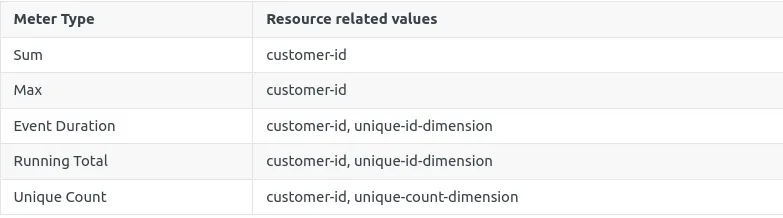
As described above, the resource-related properties help identify the specific resource instance that was used to serve the customer.
To cancel the events associated with that resource, simply send a new ingest event that includes the appropriate resource ID and related dimensions and an additional dimension: “aflo.cancel_previous_resource_event” with “true” as its value. This instructs Amberflo to locate and cancel any previously ingested events related to that resource. For example, for the ‘Rabbit-IO’ example mentioned above, ‘Rabbit-IO’ needs to send the following ingest event in order to cancel the usage:
[{
    "customerId": "Smart-ML-123", // the actual customer id of Smart-ML
    "meterApiName": "cpu-used",
    "meterValue": 0, // the value of the cancellation event doesn’t matter
    "meterTimeInMillis": 1666278270000, // 10/20/2022 at 15:04:30
    "dimensions": {
        "cluster": "X",
        "aflo.cancel_previous_resource_event": "true"
    }
}]
📘 Limitations
When canceling events using resource-related properties and the aflo.cancel_previous_resource_event flag, there are a few important constraints to keep in mind:
1. 9-Hour Time Limit
You have up to 9 hours from the time a resource starts being used to cancel the associated usage event.
2. Timestamp of the Cancellation Event
- The timestamp of the cancellation event must be no later than 9 hours after the original usage event.
- For best results, set the cancellation event’s timestamp to be:
- As close as possible to the original event
- Or even use the exact same timestamp as the event you are canceling
Why These Limitations Exist?
When you define a cancellation event using only resource-related properties, you're not explicitly identifying the exact meter event to be canceled (e.g., by unique ID).
Because of this, Amberflo operates under the assumption that you're targeting a recent event and will:
- Search for the most recent event related to the specified resource within the last 9 hours
- Cancel that event if it exists
Important: If the same resource was used more than once in that time window, Amberflo will cancel only the most recent of those events.
Also note that the value of the cancellation event does not matter, because its only purpose is to signal the system to drop the matching usage record—not to report usage.
Canceling unintentional or unsuccessful Usage (advance)
The aflo.cancel_previous_resource_event flag, as described earlier, is used for dynamically canceling usage events. This mechanism can target events such as: start using a resource, stop using a resource, or an update to the usage rate.
For Max or Total Duration meters, Amberflo supports an additional flag to refine cancellation behavior: "aflo.ignore_cancellation_if_no_usage" This secondary flag is only meaningful when used together with aflo.cancel_previous_resource_event. If aflo.ignore_cancellation_if_no_usage is set to true, Amberflo will: ignore the cancellation of a "stop" event if there was no usage recorded between the original start and stop events.
This prevents cancellations from invalidating periods where no actual usage occurred—a useful safeguard for duration-based meters.
Example:
Let’s assume you are using a total-duration meter and the following three events were ingested:
// Start usage
{
    "customerId": "Smart-ML-123", // the actual customer id of Smart-ML
    "meterApiName": "cpu-used",
    "meterValue": 10,
    "meterTimeInMillis": 1646321760, // 3/3/2022 at 3:36am
    "dimensions": {
        "cluster": "X",
    }
},
// Stop usage
{
    "customerId": "Smart-ML-123", // the actual customer id of Smart-ML
    "meterApiName": "cpu-used",
    "meterValue": 0,
    "meterTimeInMillis": 1646321820, // 3/3/2022 at 3:37am
    "dimensions": {
        "cluster": "X",
    }
},
// Cancelation
{
    "customerId": "Smart-ML-123", // the actual customer id of Smart-ML
    "meterApiName": "cpu-used",
    "meterValue": 0,
    "meterTimeInMillis": 1646321880, // 3/3/2022 at 3:38am
    "dimensions": {
        "cluster": "X",
        "aflo.cancel_previous_resource_event": "true"
    }
}
As mentioned, event cancelation cancels the latest event regardless of what it indicates. So in the example above, after applying the dynamic cancellation, we will be left with only the start event:
// Start usage
{
    "customerId": "Smart-ML-123", // the actual customer id of Smart-ML
    "meterApiName": "cpu-used",
    "meterValue": 10,
    "meterTimeInMillis": 1646321760, // 3/3/2022 at 3:36am
    "dimensions": {
        "cluster": "X",
    }
}
Now, if we want the dynamic cancellation to cancel existing usage events (as opposed to cancelling any type of events), we will need to add the "aflo.ignore_cancellation_if_no_usage", with "true" as a value, to the 3rd event. So the sequence of events sent to Amberflo will look like:
// Start usage
{
    "customerId": "Smart-ML-123", // the actual customer id of Smart-ML
    "meterApiName": "cpu-used",
    "meterValue": 10,
    "meterTimeInMillis": 1646321760, // 3/3/2022 at 3:36am
    "dimensions": {
        "cluster": "X",
    }
},
// Stop usage
{
    "customerId": "Smart-ML-123", // the actual customer id of Smart-ML
    "meterApiName": "cpu-used",
    "meterValue": 0,
    "meterTimeInMillis": 1646321820, // 3/3/2022 at 3:37am
    "dimensions": {
        "cluster": "X",
    }
},
// Cancelation
{
    "customerId": "Smart-ML-123", // the actual customer id of Smart-ML
    "meterApiName": "cpu-used",
    "meterValue": 0,
    "meterTimeInMillis": 1646321880, // 3/3/2022 at 3:38am
    "dimensions": {
        "cluster": "X",
        "aflo.cancel_previous_resource_event": "true",
        "aflo.ignore_cancellation_if_no_usage": "true"  // <== NOTICE: Additional Secondary Flag
    }
}
In this case the result of the system run will be:
{
    "customerId": "Smart-ML-123", // the actual customer id of Smart-ML
    "meterApiName": "cpu-used",
    "meterValue": 10,
    "meterTimeInMillis": 1646321760, // 3/3/2022 at 3:36am
    "dimensions": {
        "cluster": "X",
    }
},
// Stop usage
{
    "customerId": "Smart-ML-123", // the actual customer id of Smart-ML
    "meterApiName": "cpu-used",
    "meterValue": 0,
    "meterTimeInMillis": 1646321820, // 3/3/2022 at 3:37am
    "dimensions": {
        "cluster": "X",
    }
}
This is because there was no usage to cancel for the 3rd event.
📘 NOTICE
"aflo.ignore_cancellation_if_no_usage" has a meaning only in the context of "Max" or "Total Duration" meters.