API Gateway - Kong
2 min
You can use Amberflo's API Metering plugin for Kong to:
- Meter API requests handled by your Kong instance
- Monetize your APIs based on usage
For implementation details, see the GitHub repository
How it Works
- Request Interception The plugin intercepts incoming API requests handled by Kong.
- Customer Identification It determines which customer is making the request by inspecting request headers. You can configure Kong to inject the customerId header before this plugin runs.
- Example: If you use Kong's Key Authentication plugin, this is done automatically.
- Meter Event Generation The plugin generates a meter event for each request.
- Efficient Metering To avoid performance overhead:
- Meter records are batched
- Records are sent to Amberflo asynchronously
This setup ensures high-throughput usage tracking with minimal impact on gateway performance.
Installation
- Compile the Plugin Binary Compile the plugin and make the resulting binary available to your Kong instance.
- Important: Ensure your compilation environment matches your Kong runtime environment. A mismatch may result in a binary that won't run correctly.
- Update Kong Configuration Add the plugin to your Kong configuration. For example, if you place the plugin server binary at: /opt/amberflo/metering then the relevant sections of your kong.conf file should resemble this one. For more detailed guidance on configuring Kong, refer to their official documentation here and here.
- Enable the plugin You can enable the plugin in one of two ways:
- Add it to your kong.yaml file
- Or enable it via a call to the Kong Admin API
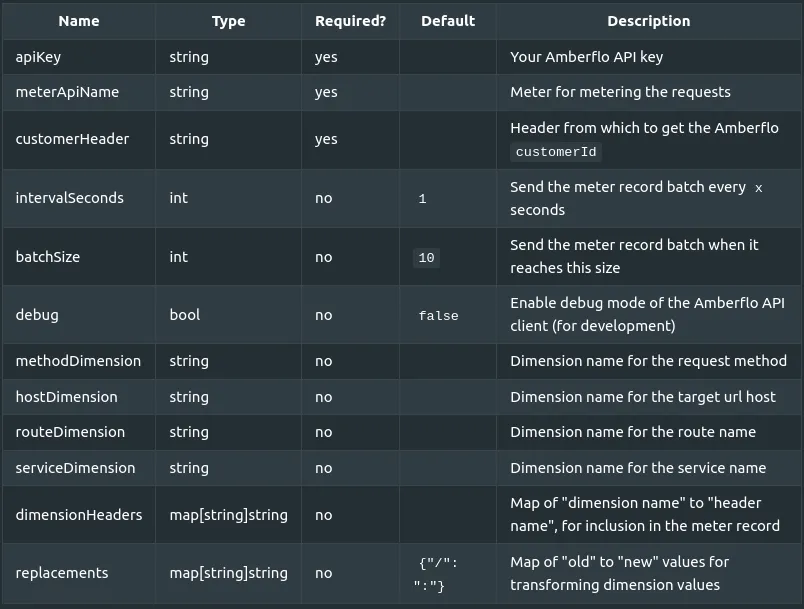
Configuration
Please find a sample configuration file here.
Here's a breakdown of the fields and their respective meanings.