Alert Webhooks
4 min
Alerts can be delivered using a webhook. When configured this way, Amberflo will make an HTTP POST request to the specified endpoint whenever the alert threshold condition is met.
The request will contain a JSON payload with the relevant alert information. If the endpoint responds with a 200 status code, the delivery is considered successful. Any other status code will be treated as a failure, and the system will retry sending the alert.
Context Variables
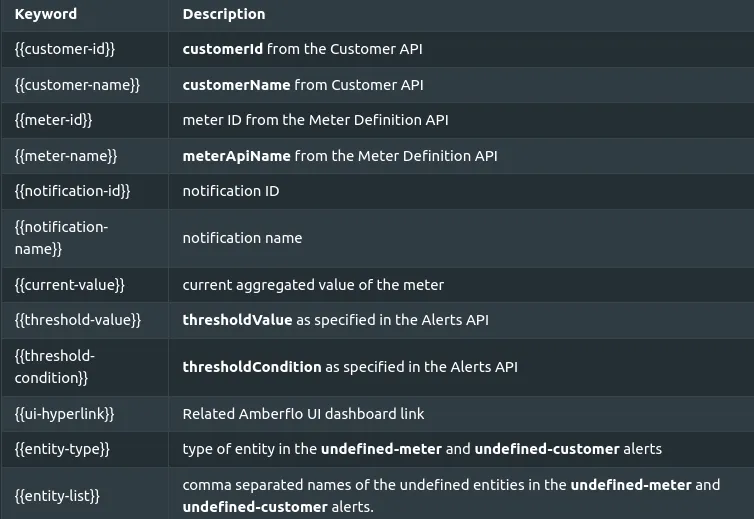
The following context variables can be used to set a webhook request header and payload:
Sample Webhook for Slack
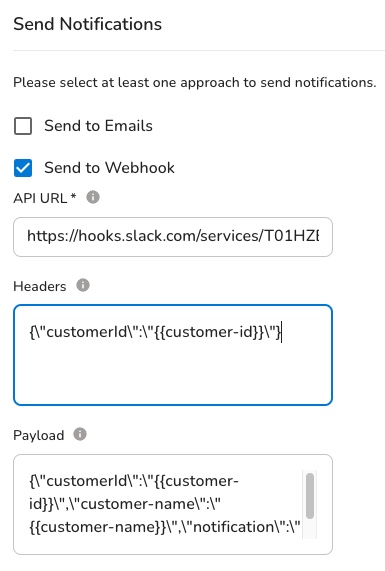
Create the alert using the Alerts UI:
Or using the Alerts API :
curl --location --request POST 'https://app.amberflo.io/notification' \
--header 'Content-Type: application/json' \
--header 'X-API-KEY: xyz' \
--data-raw '{
    "name": "usage-alert",
    "meterId" : "4d1ca680-4974-11ec-ad9b-e1ce3f8b2ad3",
    "cron": "0 0 * * 0",
    "webhookUrl": "https://hooks.slack.com/services/T01HZB7A0M6/B01N83NQV6H/lMa2sYqDUnV3a7cLbBD9234",
    "webhookPayload": "{\"text\":\"Amberflo Notification {{notification-name}} \",\"blocks\":[{\"type\":\"section\",\"text\":{\"type\":\"mrkdwn\",\"text\":\"Amberflo notification: {{notification-name}}\"}},{\"type\":\"section\",\"block_id\":\"section567\",\"text\":{\"type\":\"mrkdwn\",\"text\":\"Your meter value has exceeded the allowed threshold limit.\"}},{\"type\":\"section\",\"block_id\":\"section789\",\"fields\":[{\"type\":\"mrkdwn\",\"text\":\"*Customer*\\n {{customer-name}}\"},{\"type\":\"mrkdwn\",\"text\":\"*Meter*\\n {{meter-name}}\"},{\"type\":\"mrkdwn\",\"text\":\"*Threshold condition*\\n {{threshold-condition}}\"},{\"type\":\"mrkdwn\",\"text\":\"*Threshold limit*\\n {{threshold-value}}\"},{\"type\":\"mrkdwn\",\"text\":\"*Current value*\\n {{current-value}}\"}]},{\"type\":\"section\",\"block_id\":\"section790\",\"text\":{\"type\":\"mrkdwn\",\"text\":\"<{{ui-hyperlink}}|Click here to view usage details>\"}}]}",
    "thresholdCondition": "greater-than",
    "thresholdValue": "1000",
    "range":"day",
    "customerFilterMode": "per-customer",
    "enabled": true
}'
Sample webhook payload for Slack
{
    "text": "Amberflo Notification {{notification-name}} ",
    "blocks": [
        {
            "type": "section",
            "text": {
                "type": "mrkdwn",
                "text": "Amberflo notification: {{notification-name}}"
            }
        },
        {
            "type": "section",
            "block_id": "section567",
            "text": {
                "type": "mrkdwn",
                "text": "Your meter value has exceeded the allowed threshold limit."
            }
        },
        {
            "type": "section",
            "block_id": "section789",
            "fields": [
                {
                    "type": "mrkdwn",
                    "text": "*Customer*\n {{customer-name}}"
                },
                {
                    "type": "mrkdwn",
                    "text": "*Meter*\n {{meter-name}}"
                },
                {
                    "type": "mrkdwn",
                    "text": "*Threshold condition*\n {{threshold-condition}}"
                },
                {
                    "type": "mrkdwn",
                    "text": "*Threshold limit*\n {{threshold-value}}"
                },
                {
                    "type": "mrkdwn",
                    "text": "*Current value*\n {{current-value}}"
                }
            ]
        },
        {
            "type": "section",
            "block_id": "section790",
            "text": {
                "type": "mrkdwn",
                "text": "<{{ui-hyperlink}}|Click here to view usage details>"
            }
        }
    ]
}
Alerts will send the following HTTP request to the webhook endpoint:
curl --location --request POST 'https://hooks.slack.com/services/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' \
--header 'Content-Type: application/json' \
--data-raw '{
    "text": "Amberflo Notification alert-for-prepaid ",
    "blocks": [
        {
            "type": "section",
            "text": {
                "type": "mrkdwn",
                "text": "Amberflo notification: alert-for-prepaid"
            }
        },
        {
            "type": "section",
            "block_id": "section567",
            "text": {
                "type": "mrkdwn",
                "text": "Your meter value has exceeded the allowed threshold limit."
            }
        },
        {
            "type": "section",
            "block_id": "section789",
            "fields": [
                {
                    "type": "mrkdwn",
                    "text": "*Customer*\n Oceanic Airlines"
                },
                {
                    "type": "mrkdwn",
                    "text": "*Threshold condition*\n less-than"
                },
                {
                    "type": "mrkdwn",
                    "text": "*Threshold limit*\n 1000000000"
                },
                {
                    "type": "mrkdwn",
                    "text": "*Current value*\n 40384"
                }
            ]
        },
        {
            "type": "section",
            "block_id": "section790",
            "text": {
                "type": "mrkdwn",
                "text": "<https://ui.amberflo.io/customers/54a43bba-915d-4512-a0bd-9d9debesase|Click here to view usage details>"
            }
        }
    ]
}'
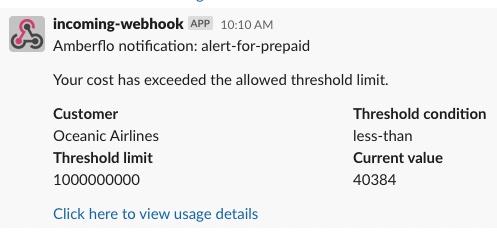
And the rendered Slack message will look like this: