SDK Sample Code
This sample demonstrates how to ingest meter events using the Amberflo SDK in a Spring Boot application.
Steps:
- Set Up the Amberflo Environment Prepare your application environment with the required Amberflo client settings (e.g., API keys, region, etc.).
- Configure Service Discovery Set up your application to discover and communicate with Amberflo’s ingestion service.
- Create a Helper Method Implement a helper function to map your internal objects to the Amberflo ingestion payload format.
Maven dependencies (check for latest versions):
<dependencies>
  <dependency>
    <groupId>io.amberflo</groupId>
    <artifactId>metering-java-client</artifactId>
    <version>1.3.6</version>
  </dependency>
  <dependency>
		<groupId>org.projectlombok</groupId>
		<artifactId>lombok</artifactId>
		<version>1.18.20</version>
	</dependency>
</dependencies>
Environment Setup Details
- Configure the necessary environment variables for the Amberflo SDK client.
- Add the required configuration entries to your application properties or environment.
- Ensure the service is discoverable by the Amberflo client at runtime.
amberflo.apiKey=your-api-key-here
amberflo.region=US_West
amberflo.domain=Prod
amberflo.ingestion.frequency.seconds=1
amberflo.ingestion.batch.size=10
amberflo.isDebug=true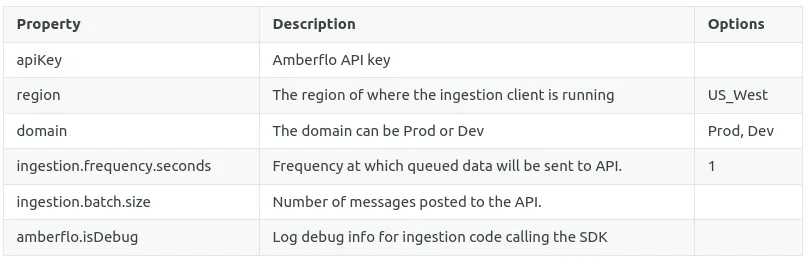
import com.amberflo.metering.ingest.meter_message.Domain;
import lombok.Getter;
import org.springframework.beans.factory.annotation.Value;
import org.springframework.stereotype.Component;
import com.amberflo.metering.ingest.meter_message.Region;

@Getter
@Component
public class AmberfloEnvironment {

    @Value("${amberflo.apiKey}")
    private String apiKey;

    @Value("${amberflo.region}")
    private Region region;

    @Value("${amberflo.domain}")
    private Domain domain;

    @Value("${amberflo.ingestion.frequency.seconds}")
    private Double ingestionFrequencyInSeconds;

    @Value("${amberflo.ingestion.batch.size}")
    private Integer ingestionBatchSize;
}
Setup Amberflo client bean for service discoverability
Amberflo provides a singleton instance of the client to ensure efficient ingestion of meter events.
To enable dependency injection and make the client discoverable as a service within your Spring Boot application:
- Create a configuration class
- Define a method that returns the Amberflo client as a Spring bean
This allows other components in your application to inject the Amberflo client where needed, promoting reusability and centralized configuration.
import com.amberflo.metering.ingest.MeteringContext;
import org.apache.logging.log4j.LogManager;
import org.apache.logging.log4j.Logger;
import org.springframework.beans.factory.annotation.Autowired;
import org.springframework.context.annotation.Bean;
import org.springframework.context.annotation.Configuration;

@Configuration
public class AmberfloClientConfig {

    @Autowired
    private AmberfloEnvironment amberfloEnvironment;

    @Bean
    public MeteringContext meteringContext() {
        MeteringContext meteringContext = null;
        try{
            meteringContext = MeteringContext.createOrReplaceContext(
                    this.amberfloEnvironment.getApiKey(),
              			//TODO: enter your service name here
              			//The service name will be added for all of your meters as an extra dimension.
                    "service-name",
                    this.amberfloEnvironment.getDomain(),
                    this.amberfloEnvironment.getRegion(),
                    this.amberfloEnvironment.getIngestionFrequencyInSeconds(),
                    this.amberfloEnvironment.getIngestionBatchSize());
            if(meteringContext.meteringInstance() != null) {
                LOGGER.info("Amberflo client initialized with region={}, domain={}, frequency={}, batchSize={}",
                        this.amberfloEnvironment.getRegion(),
                        this.amberfloEnvironment.getDomain(),
                        this.amberfloEnvironment.getIngestionFrequencyInSeconds(),
                        this.amberfloEnvironment.getIngestionBatchSize());
            }
        }
        catch(Exception ex){
            LOGGER.error("Amberflo client initialization failed: {}", ex.getMessage());
            ex.printStackTrace();
        }

        return meteringContext;
    }
}
Entity to Amberflo payload mapper
In this approach, your internal entity is transformed into an Amberflo ingestion payload using a dedicated helper class.
For example:
- You have an entity class named Event
- This entity is mapped to the required SDK format in a helper class called AmberfloMapper
The transformation logic is encapsulated in a method like:
This method can now be called from anywhere in your code, allowing you to easily meter events across your application in a centralized and reusable way.
Sample entity class:
import java.io.Serializable;
import javax.persistence.*;
import lombok.AllArgsConstructor;
import lombok.Getter;
import lombok.NoArgsConstructor;
import lombok.Setter;

@Getter
@Setter
@NoArgsConstructor
@AllArgsConstructor
@Entity
@Table(name = "event")
public class Event implements Serializable {
    private static final long serialVersionUID = 1L;

    @Id
    @GeneratedValue(strategy=GenerationType.IDENTITY)
    private long id;

    @Column(name = "event_source_type")
    private String eventSourceType;

    @Column(name = "event_type")
    private String eventType;

    @Column(name = "customer_id")
    private String customerId;
}
Sample mapper helper:
import org.apache.logging.log4j.LogManager;
import org.apache.logging.log4j.Logger;

import java.time.LocalDateTime;
import java.time.ZoneOffset;
import java.util.HashMap;
import java.util.Map;

import static com.amberflo.metering.ingest.MeteringContext.metering;

public class AmberfloMapper {
    private static final Logger LOGGER = LogManager.getLogger();

    public static void ingestMeterForEvent(final Event event, final String meterName){
        try {
            final String customerId = event.getCustomerId();
            final double meterValue = 1.0;
            final LocalDateTime eventTime = LocalDateTime.now(ZoneOffset.UTC);
            final Map<String, String> dimensions = new HashMap();
            dimensions.put("event_source_type", event.getEventSourceType());
            dimensions.put("event_type", event.getEventType());
            metering().meter(customerId, meterName, meterValue, eventTime, dimensions);
            LOGGER.info("Amberflo ingestion: event id {}, customerId {}, meter {}, event source type {}, event type {}",
                    event.getId(), customerId, meterName, dimensions.get("event_source_type"), dimensions.get("event_type"));
        } catch (Exception ex) {
            LOGGER.error("Amberflo ingestion failed: {}", ex.getMessage());
            ex.printStackTrace();
        }
    }
}