Alert Types
The following alert (aka. notification) types can be created using the Alerts UI Dashboard or Alerts API
Usage
Usage alerts are scheduled checks that trigger based on meter consumption.
- Specify using a cron expression (some cron examples).
- Set the range (hour, day, week, month).
- Select the meter by setting the meterId. It can found by calling the [Meter Definition API].(Get a list of meters) or UI Dashboard
- Select the thresholdCondition and set the thresholdValue
At the defined schedule, Amberflo calls the Usage API to evaluate the condition against the current usage. If the condition is met for a customer, the alert is triggered.
curl --location --request POST 'https://app.amberflo.io/notification' \
--header 'Content-Type: application/json' \
--header 'X-API-KEY: xyz' \
--data-raw '{
    "name": "usage-alert",
    "meterId" : "4d1ca680-4974-11ec-ad9b-e1ce3f8b2ad3",
    "cron": "0 0 * * 0",
    "webhookUrl": "https://hooks.slack.com/services/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3",
    "email":"[email protected]",
    "thresholdCondition": "greater-than",
    "thresholdValue": "1000",
    "range":"day",
    "customerFilterMode": "per-customer",
    "enabled": false
}'
Prepaid Credits
This is a real-time alert that applies only to prepaid customers. It triggers when a customer's prepaid credits fall below a defined threshold, prompting them to top up.
- Set the thresholdValue for the prepaid balance.
- The thresholdCondition is always less-than.
- The evaluation is done for the current billing cycle.
If a customer's prepaid balance on the active invoice drops below the threshold, the alert will be fired.
curl --location --request POST 'https://app.amberflo.io/notification' \
--header 'Content-Type: application/json' \
--header 'X-API-KEY: xyz' \
--data-raw '{
    "name": "alert-for-prepaid",
    "notificationType": "prepaid",
    "email": ["[email protected]", "[email protected]"],
    "webhookUrl": "https://hooks.slack.com/services/T01HZB7A0M6/B01P3J0LE0H/OBRoTt8TmrJ2Zbv3bQAqH88",
    "thresholdValue": "1000",
    "customerFilterMode": "per-customer",
    "enabled": true
}'
Invoice
Invoice alerts are real-time and apply to customers with billing enabled through an assigned pricing plan.
- Set the thresholdValue for the total invoice amount.
- The thresholdCondition is always greater-than.
- The evaluation is based on the current billing cycle and applies to the active invoice.
If the total on a customer’s current invoice exceeds the set threshold, an alert is triggered.
curl --location --request POST 'https://app.amberflo.io/notification' \
--header 'Content-Type: application/json' \
--header 'X-API-KEY: xyz' \
--data-raw '{
    "name": "invoice-tracker",
    "notificationType": "invoice",
    "email": ["[email protected]"],
    "thresholdValue": "500",
    "customerFilterMode": "per-customer",
    "enabled": true
}'
Product Item Usage Limit
This real-time alert is relevant only to invoices that include a breakdown by product items. Since product items are mapped to specific meters, the alert monitors meter unit consumption (or quantity) for a product item as displayed on the invoice.
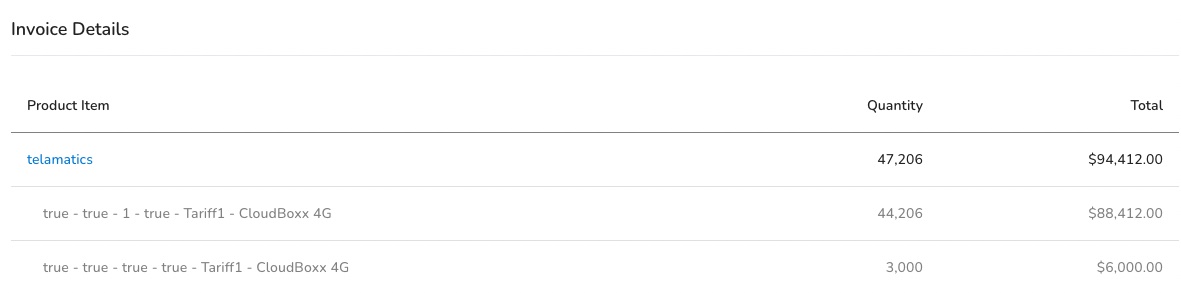
- Select the meter by setting the meterId. It can found by calling the List Meters API or UI Dashboard
- Select the pricing plan by setting the productPlanId. This can be obtained from the Account Pricing API or UI Dashboard
- Set the meter units limit thresholdValue.
- The thresholdCondition is always greater-than
- The range or time bucket is always the current billing cycle.
If the meter units or quantity on the current invoice for the selected meter and pricing plan exceeds the thresholdValue, then it will fire an alert.
curl --location --request POST 'https://app.amberflo.io/notification' \
--header 'Content-Type: application/json' \
--header 'X-API-KEY: xyz' \
--data-raw '{
    "name": "product-item-units-tracker",
    "notificationType": "product-item-units",
    "productPlanId":"ff9c55a9-4796-480f-ab77-2ae943ae1700",
    "email": ["[email protected]"],
    "thresholdValue": "100",
    "customerFilterMode": "per-customer",
    "meterId":"21b71110-ee51-11ec-ad99-5b1b04dba7a5",
    "enabled": true
}'
Product Item Charge Amount
This is the same as Product Item Usage Limit, except it tracks the product item total charge on the current invoice instead of the meter units.
- Select the meter by setting the meterId. It can found by calling the List Meters API or UI Dashboard
- Select the pricing plan by setting the productPlanId. This can be obtained from the Account Pricing API or UI Dashboard
- Set the product item charge limit thresholdValue
- The thresholdCondition is always greater-than
- The range or time bucket is always the current billing cycle.
If the total product item total charge on the current invoice for the selected meter and pricing plan exceeds the thresholdValue, then it will fire an alert.
curl --location --request POST 'https://app.amberflo.io/notification' \
--header 'Content-Type: application/json' \
--header 'X-API-KEY: xyz' \
--data-raw '{
    "name": "product-item-price-tracker",
    "notificationType": "product-item-price",
    "productPlanId":"ff9c55a9-4796-480f-ab77-2ae943ae1700",
    "email": ["[email protected]"],
    "thresholdValue": "200",
    "customerFilterMode": "per-customer",
    "meterId":"21b71110-ee51-11ec-ad99-5b1b04dba7a5",
    "enabled": true
}'
Undefined Customer
This scheduled alert is triggered when ingested records reference a customer that does not exist in Amberflo. To prevent alert fatigue, there is a one-hour cool-down period between alerts of this type.
curl --location --request POST 'https://app.amberflo.io/notification' \
--header 'Content-Type: application/json' \
--header 'X-API-KEY: xyz' \
--data-raw '{
    "name": "Undefined Customer",
    "notificationType": "undefined-customer",
    "email": ["[email protected]"]
}'
Undefined Meter
This scheduled alert is triggered when ingested records reference a meter that has not been defined in Amberflo. Like the undefined customer alert, it includes a one-hour cool-down period between notifications.
curl --location --request POST 'https://app.amberflo.io/notification' \
--header 'Content-Type: application/json' \
--header 'X-API-KEY: xyz' \
--data-raw '{
    "name": "Undefined Meter",
    "notificationType": "undefined-meter",
    "email": ["[email protected]"]
}'