Hooks
We provide several hooks to access the same data used in our components.
Hooks are used to retrieve data directly from the API, and they return the same data shown in the widgets. The key benefit is that the data is automatically cached, helping your app run more efficiently.
You can use these hooks if you want to:
- Build and render your own components using Amberflo data
- Track the loading status or data availability of a component
- Subscribe to updates used in the widgets
Each widget’s documentation specifies which hooks it uses.
All hooks can be imported from:
import { ... } from '@amberflo/uikit`And they can be used as:
const { data, isFetching, isError, error, isSuccess, isIdle } = useHookName(<some parameters>)Notice
- Amberflo hooks are supported in React 16.8 and above. If you're using an older version of React, hooks will not be available.
- Additionally, hooks can only be used within functional components. If you're working with class components, you’ll need to either refactor them into functional components or use a Higher-Order Component (HOC) as a workaround.
Common attributes
Every Amberflo hook returns an object containing the following keys:
- data: The response returned by the hook. The structure and contents of this value depend on the specific hook being used.
- isFetching: A boolean indicating whether the hook is currently fetching data. Useful for displaying loading indicators.
- isError: A boolean that becomes true if an error occurred while fetching data.
- error: Contains the error object or message if the hook encountered an issue during data retrieval.
- isSuccess: A boolean indicating that the data fetch has completed successfully.
- isIdle: A boolean indicating that the hook is not currently fetching data and is in an idle state—whether due to completion or failure of the fetch.
Available hooks are
useCost
Parameters
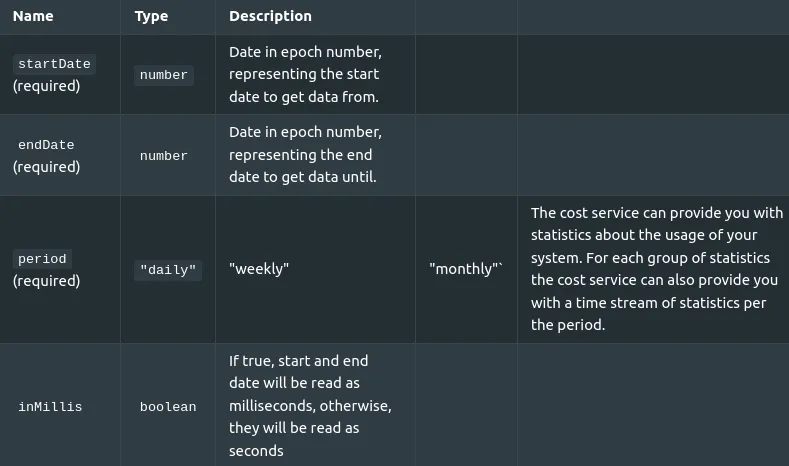
This hook will internally call the cost API call . And returns it's data.
Structure of the hook:
const useCost = (
  startDate: number,
  endDate: number,
  period: string
) => {
  data: CostResponse
  /* This hook will have all common attributes also */
}
You can see all common attributes here .
useCreditsLedger
No parameters are required
This hook will internally call the customer credits ledger api call and return its data.
Structure of the hook
const {
    data: creditsLedger,
    /* This hook will have all common attributes also */
  }
You can see all common attributes here.
useCurrentPricingPlan
No parameters are required
This hook will internally call the current pricing plan details api call and return its data.
Structure of the hook:
const useCurrentPricingPlan = () => {
  data: PricingPlanResponse,
  handleSelectPlan: (pricingPlanId: string) => void
  /* This hook will have all common attributes also */
}
usePricingPlanDetails
No parameters are required
This hook will internally call the current pricing plan details api call and the set new pricing plan api call a pricing plan and return its data.
Structure of the hook:
const usePricingPlanDetails = () => {
  data: PricingPlanResponse,
  handleSelectPlan: (pricingPlanId: string) => void
  /* This hook will have all common attributes also */
}handleSelectPlanwill receive a new pricing plan, and set it to the customer.
You can see all common attributes here.
useInvoiceDetails
Parameters
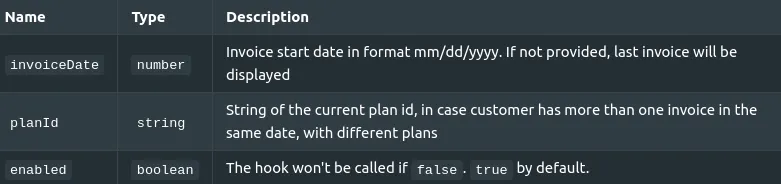
This hook will internally call the get customer portal api call and return its data.
Structure of the hook:
const useInvoiceDetails = (
  invoiceDate?: string,
  planId?: string,
  enabled?: boolean = true
) => {
  data: InvoiceType
  /* This hook will have all common attributes also */
}
You can see all common attributes here.
useLatestInvoice
No parameters are required
This hook will internally call the get customer api and return its data.
Structure of the hook:
const useLatestInvoice = () => {
  data: InvoiceType
  /* This hook will have all common attributes also */
}
You can see all common attributes here.
useInvoices
No parameters are required
This hook will internally call the get all cutomer invoices api call and return its data.
Structure of the hook:
const useInvoices = () => {
  data: InvoiceType[]
  /* This hook will have all common attributes also */
}
You can see all common attributes here.
useMeters
No parameters are required
This hook will internally call the get all meters api call and return its data.
Structure of the hook:
cosnt useMeters = () => {
  data: Meter[]
  /* This hook will have all common attributes also */
}
You can see all common attributes here.
usePrepaidSummary
No parameters are required
This hook will internally call the customer prepaid wallet api call and return its data.
Structure of the hook
const usePrepaidSummary = () => {
  data: PrepaidItem[]
  /* This hook will have all common attributes also */
}
You can see all common attributes here.
useProductItems
No parameters are required
This hook will internally call the /product-itemsapi call. Returning a list of product items, including its: id, description, lastUpdateTimeInMillis, lockingStatus, productId, meterApiName, productItemName.
Structure of the hook:
const useProductItems = () => {
  data: ProductItemDefinition[]
  /* This hook will have all common attributes also */
}
You can see all common attributes here.
useStripeClientSecret
No parameters are required
This hook will internally call the customer setup intent api call and return its data.
Structure of the hook:
const useStripeClientSecret = () => {
  data: string
  /* This hook will have all common attributes also */
}
You can see all common attributes here.
useUsage
Parameters
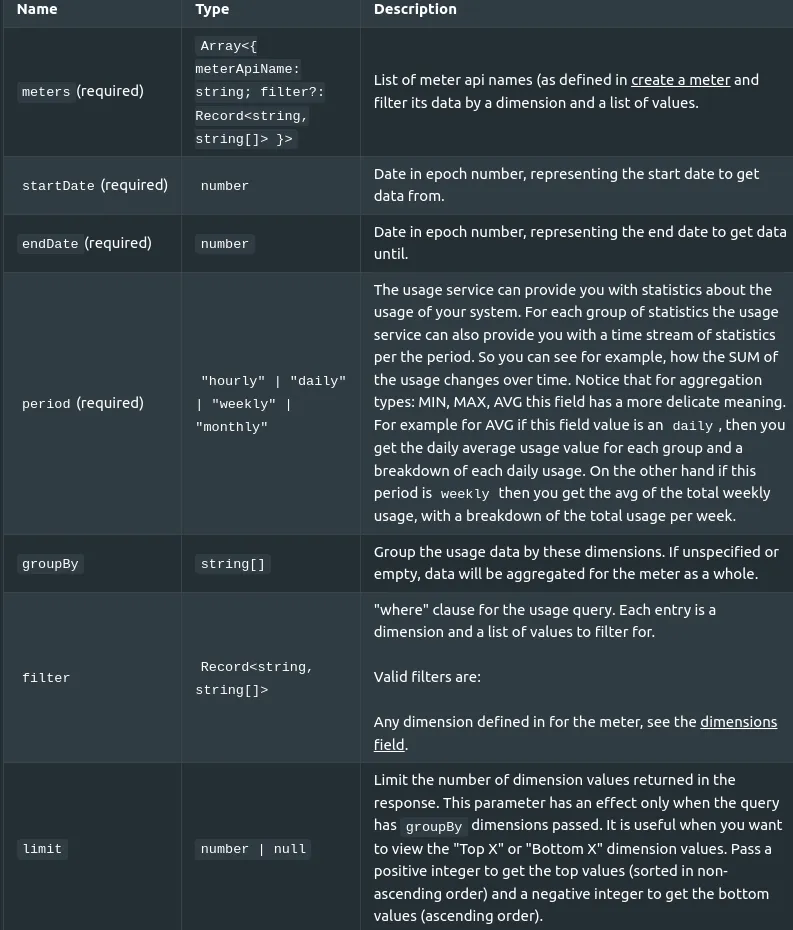
Structure of the hook:
const useUsage = (
  meters: Array<{ meterApiName: string; filter?: Record<string, string[]> }>,
  startDate: number,
  endDate: number,
  period: string,
  groupBy?: string
) => {
  data: UsageResponse[]
  /* This hook will have all common attributes also */
}
You can see all common attributes here.